orkiva
 Browse the catalog#
- Open Applications → App Catalog and select a chart source/repository.
- Search for the chart and open its detail page.
- Inspect the selected chart version, documentation and default values exposed by the page.
- Verify the chart package is reachable from the Orkiva server; a catalog entry without a package URL cannot be installed.
The catalog offers configured repositories and, when enabled by server capability, Artifact Hub. Artifact Hub is an external discovery service and its view includes publisher filtering. In a disconnected installation, use reachable configured repositories rather than assuming external discovery works offline.
Prepare the release#
- Choose Install. Confirm the current cluster first.
- Set a release name and select the namespace, or use manual namespace entry where appropriate.
- If creating a namespace through the form, explicitly review its create-namespace option.
- Enter custom values as a YAML object. Arrays or scalar values at the document root are rejected.
- Run the dry-run preview and inspect the rendered objects. Review privileged objects, storage and public endpoints before installation.
Install and verify#
Submit the installation after reviewing the preview. Open the resulting Helm release and inspect its status and resources. Check pods and events for application startup problems. A rendered dry run verifies a proposed manifest path, but is not proof that the running application will pass its health checks.
Changing values after a dry run changes the inputs; preview again before relying on the earlier output. Use repository/version identifiers that match the release you intend to deploy.
Repository administration#
Repository management is protected by administrator routes. Configure trusted repository locations and credentials with the administrator controls. If a chart cannot be fetched, inspect repository reachability, authentication, package URL and installation egress rules rather than pasting credentials into a URL.
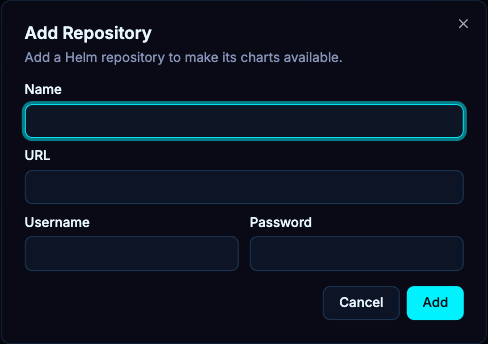
In the repositories view, an authorized administrator can add a repository with a name, URL and optional username/password. Review the source, then verify charts load. Deleting a repository entry removes that catalog configuration; it is not the same action as uninstalling a release already deployed from it.