 orkiva
 Create a drift schedule#
- Open Delivery Settings and the drift-schedule controls.
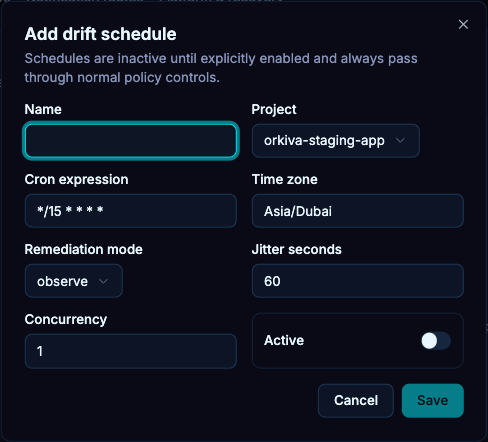
- Name the schedule and choose the project.
- Enter the cron expression and explicit time zone.
- Choose observe, plan or reconcile mode. Start with observe when validating a new schedule.
- Set jitter, concurrency and enablement, then save.
- Check the next evaluation and last-result information on the project’s Drift view.
Choose the mode deliberately#
| Mode | Intent |
|---|---|
| observe | Observe divergence without assuming a corrective deployment is authorized. |
| plan | Produce proposed-change evidence for review. |
| reconcile | Request corrective delivery through the normal safety and policy gates. |
Reconcile can lead to actual cluster changes. It still depends on the project, target, approval, policy and change-window rules. A drift badge with an old observation time should be refreshed before acting.
Configure a change window#
- Open change-window management in Delivery Settings.
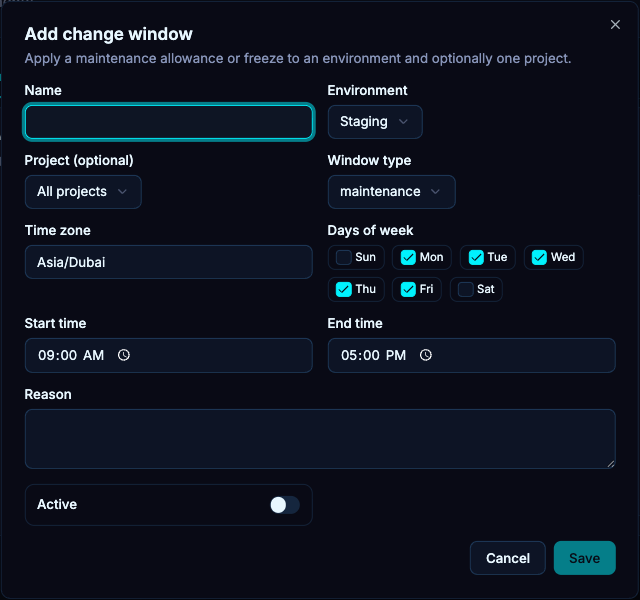
- Choose the environment and, optionally, a single project.
- Select maintenance or freeze, then enter the time zone, days, start/end times and a reason.
- Save and verify the resulting window against the intended local time.
- Check a blocked run’s reason before changing a window; a freeze may be working exactly as intended.
Pause or change automation#
Disable the specific schedule when you need to stop future evaluations. Review project polling/automation separately; disabling a drift schedule is not the same as disabling source polling. Existing runs need their own state-aware cancellation/recovery decisions.