 orkiva
 Create a policy safely#
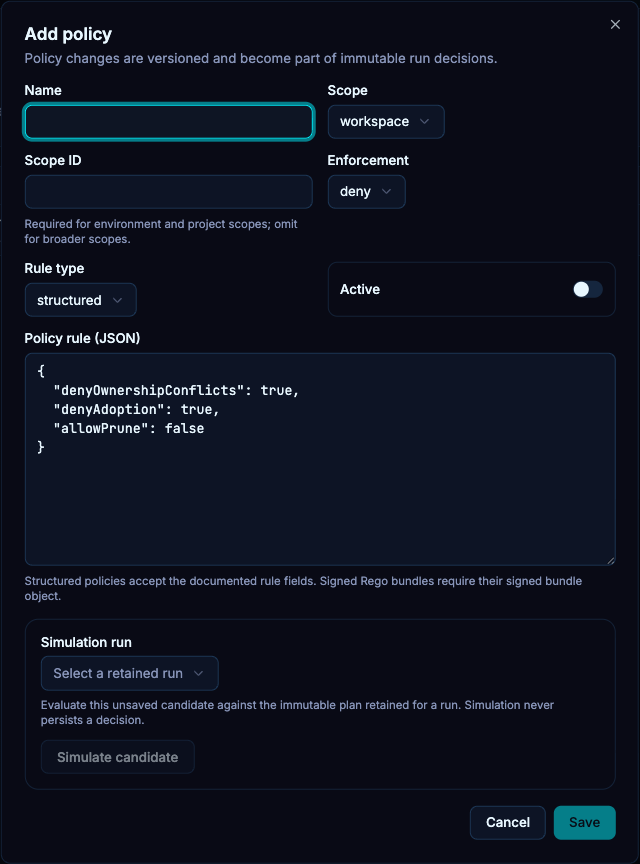
- Open Policies and create a named policy.
- Choose its scope and the matching scope identifier when required. The code supports platform, organization, workspace, environment and project scopes.
- Choose enforcement and a rule type. The form supports structured rules or signed Rego bundles.
- Enter a JSON object for the rule. An array, plain string or invalid JSON is rejected.
- Leave a new rule inactive while testing. Select an existing run in the simulation controls and inspect the candidate result.
- Activate only after the simulated behavior matches the intended requirement.
Enforcement and scope#
| Choice | Meaning |
|---|---|
| deny | A matching blocking decision prevents progression. Resolve the cause rather than expecting an approval to override every denial. |
| approval | Requires the policy’s approval conditions before progression. |
| audit | Records policy evidence without treating this rule as an unconditional block. |
Policy simulation evaluates a candidate against selected run evidence. It is not a new live cluster deployment and does not prove every future source revision will produce the same decision.
Example structured rule#
This example requires digest-pinned images, disallows pruning and asks for an independent, strongly authenticated approval. Use it as an inactive candidate first and simulate it against your intended run.
{
  "requireImageDigest": true,
  "allowPrune": false,
  "requireApproval": true,
  "minimumApprovals": 1,
  "prohibitSelfApproval": true,
  "prohibitCommitterApproval": true,
  "requireMfa": true,
  "requireReauthentication": true
}
The rule schema also supports allowed/denied target IDs, namespaces, kinds and image registries, ownership/adoption restrictions, pruning limits, approval expiry and required approver groups. A rule’s content and its enforcement/scope must be reviewed together.
Signed Rego bundles#
Signed bundles require the configured trusted signing keys and supported bundle contract. An untrusted or invalid bundle must be corrected by its owner; do not disable signature verification to make it load. If no trusted keys are configured, use the supported built-in/structured mechanisms rather than claiming Rego is enabled.
Change management#
Policy updates can invalidate earlier evidence or approval eligibility. After changing a policy, inspect newly evaluated runs. Keep the rule’s scope narrow enough that a project-specific requirement does not accidentally block unrelated projects.