 orkiva
 Understand the runner boundary#
A Delivery worker pool describes execution capacity and allowed egress for runners. The compact configuration can embed a runner, while separated installations use dedicated scheduler/runner roles. Cluster Agents and Delivery workers serve different purposes; enrolling one does not enroll the other.
Create or edit a pool#
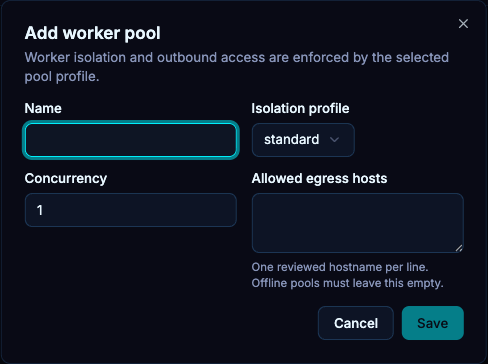
- Open Workers and create a pool.
- Set the available name, capacity/concurrency and egress settings to match the intended execution environment.
- Save and inspect the pool record.
- Configure the dedicated runner with the correct control-plane URL and matching release settings when using that layout.
The control-plane URL for a runner includes the Delivery API prefix. The installation chart documents a separate runner enrollment Secret; do not place that token in public configuration.
Issue enrollment material#
- Open Enroll for the intended pool.
- Choose a token lifetime and maximum uses. The UI starts with 1800 seconds and one use.
- Create the enrollment and transfer it through your secret-management process to the intended runner.
- Start the runner and inspect connection/worker status.
- Confirm it can fetch an allowed repository and execute a permitted non-production run.
Diagnose queued work#
- No active worker: inspect runner startup, enrollment and identity renewal.
- Pool capacity exhausted: compare active work with the configured limits rather than creating duplicate runs.
- Source fetch blocked: inspect both pool egress rules and the runner’s source-host/network configuration.
- Lease lost or worker disconnected: inspect the run’s outcome and recovery eligibility before retrying.
- Maintenance active: new mutations can be paused intentionally; check installation maintenance status.