 orkiva
 Create a provider connection#
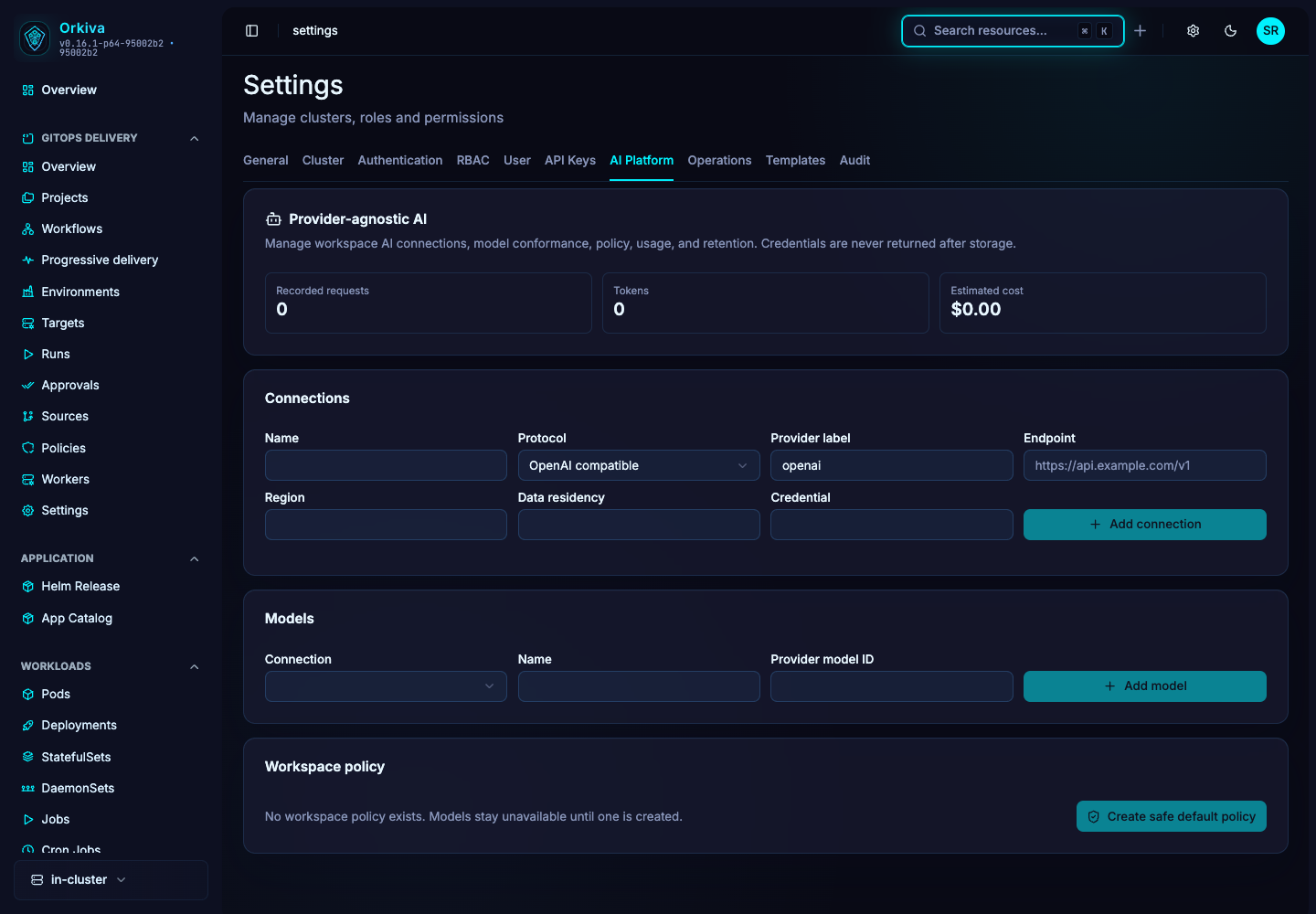
- Open Settings → AI Platform.
- Enter the connection name, protocol, provider and endpoint. Add region/residency metadata where relevant.
- Provide the managed credential if the provider requires one. The form does not display stored secrets back to users.
- Create the connection and use Test. Complete reauthentication when required.
- If the test fails, inspect endpoint/protocol compatibility, credentials, network rules and provider availability before adding models.
The protocol selector includes OpenAI-compatible, Anthropic Messages, Azure OpenAI, Amazon Bedrock, Google Gemini and Google Vertex adapters. Use the endpoint and credential form supported by the selected protocol, then test it; a selectable adapter name is not proof that a particular endpoint or account is configured correctly.
Register and test a model#
- Choose the connection and enter a display name and exact provider model identifier.
- Create the model. The UI creates it disabled, with text, streaming and tool capabilities requested.
- Run the model conformance test. It checks the supported response/tool behavior against the provider.
- Inspect the outcome. Passing conformance enables the model; a failed test leaves it unavailable.
- Verify the model becomes available to the intended policy and user scope.
Understand the default-policy action#
The page’s default-policy action selects an enabled model when possible and includes the configured models in its allowlist. Its default tools are read-oriented: resource get/list/describe, pod logs, overview and Prometheus queries. It does not automatically grant every mutating AI tool.
| Default policy field | Current UI value |
|---|---|
| Requests per minute / day | 30 / 1000 |
| Tokens per day | 1,000,000 |
| Maximum concurrent | 4 |
| Usage retention | 90 days |
| Fallback | Disabled, with no fallback model list. |
| Allowed roles/clusters/residencies | Wildcard defaults; review before broad use. |
These are defaults created by this UI action, not purchased capacity guarantees. Use the administrative API for policy settings that are not available in the console.
Monitor and revoke#
Review requests, token use and cost metadata in the usage area. Cost depends on configured price metadata and is not a replacement for the provider’s bill. Revoke a connection when it is retired; the backend disables its models. Retest after changing a provider or model configuration.